
Registration
Introduction
Purpose
The purpose of this document is to describe the registration process for a new user to complete, to request access to the National Department of Health (NDoH) Health Information Centre (HIC).
Portals
Registered and approved users will be able to access health related portals.
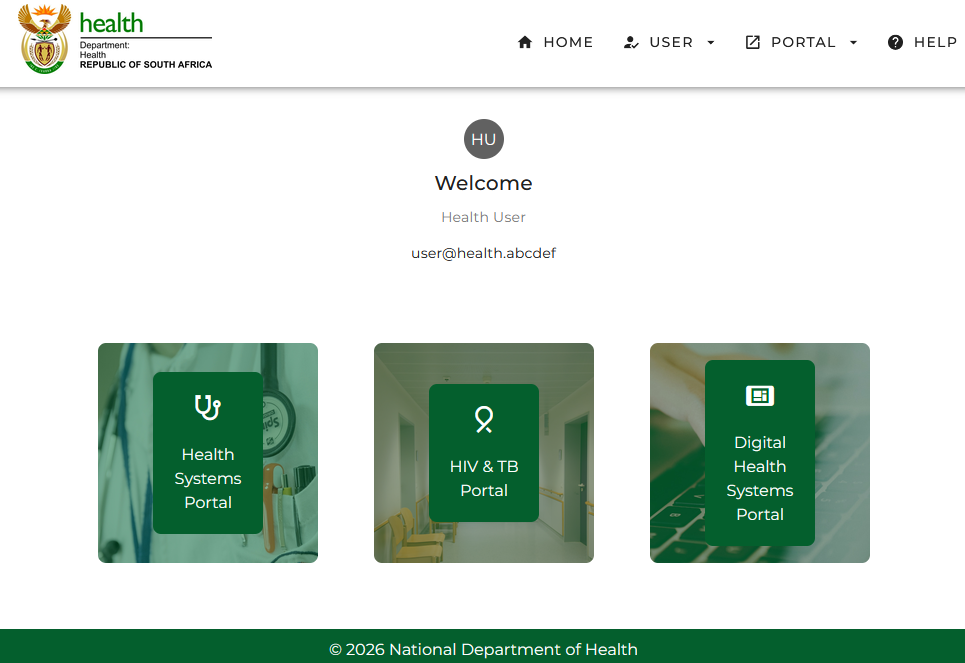
The three portals currently available are:
The Health Systems Portal
This portal contains the Health System Profiles. The profiles provide a concise overview of the demographic, socio-economic, epidemiological, service delivery platform and financial data that supports the decision-making in the health system for the selected geographical area. The data included in the profile is sourced from authoritative information systems for the specific elements.
The following decision support tools are available:
- CUP at-a-Glance
- Health System Profiles
The HIV and TB Portal
This portal contains the HIV and TB, and Close the Gap Profiles.
The HIV and TB analytics profile provides aggregated visual analytics of HIV and TB program performance for reporting and management support. Patient level data digitised into the TB and HIV information system at each facility are collated and aggregated to produce analysis in line with national indicator definitions (NIDS). This data covers the South African public health system HIV response, with the earliest digitised data starting in 2010. Analytics span the entire 95-95-95 HIV cascade, TB treatment initiation and outcomes as well as TB and HIV co-infection.
The following decision support tools are available:
- HIV Analysis
- DS-TB Analysis
- Data Quality Analysis
The Close the Gap theme provides aggregated visual analytics related to the Close the Gap campaign. The campaigned is a focused initiative aimed at accelerating the response to the HIV epidemic in South Africa by targeting high-burden districts, communities and health facilities. It is planned to put an additional 1.1 milion people living with HIV on treatment by the end of 2025.
The following decision support tool is available:
- Close the Gap
The Digital Health Systems Portal
This portal contains the Health Information Center usage report and the Electronic Medical Record report.
The Health Information Centre report provides information on the usage of the Health Information Centre system.
The following decision support tool is available:
- Health Information usage metrics
The Electronic Medical Record report provides information on the usage of the Health Information Centre system.
The following decision support tools are available:
- Electronic Medical Record Implementation Version 2
- Electronic Medical Record Implementation Daily
The Registration Process
- Open a new brower tab or browser window and navigate to https://hic.health.gov.za.
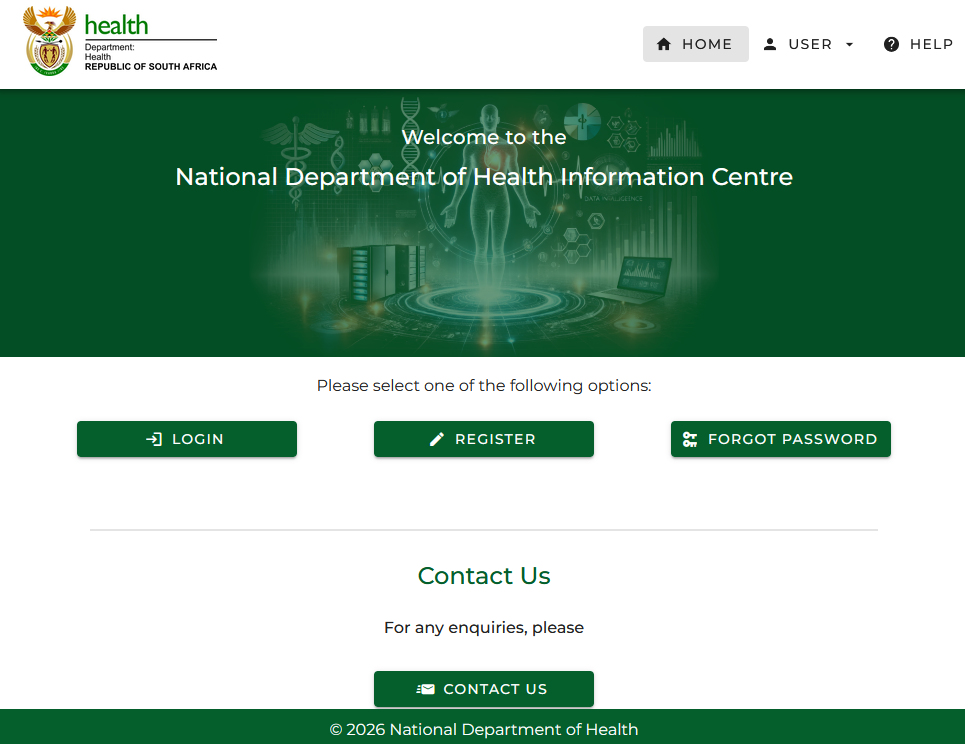
- Click on the Register button which will navigate you to the registration form.
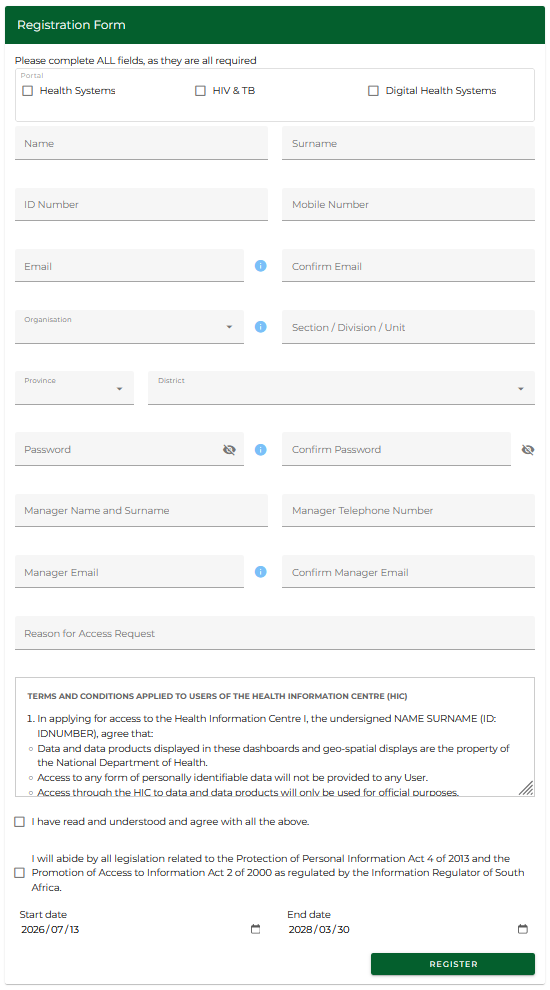
Complete the following details:
- Select Portal: Choose the appropriate portal(s) you need access to. You can select one or a combination of Health Systems, HIV & TB and Digital Health Systems.
- Name: Enter your legal first name as it appears on official documents.
- Surname: Enter your legal last name (family name).
- ID Number: Enter your South African national ID number. This is required for identity verification.
- Mobile Number: Provide a valid mobile phone number.
- Email: Enter your official work email address. This will be used for login and communication.
- Confirm Email: Re-enter the same email to confirm accuracy.
- Organisation: Select your employer from the dropdown menu (e.g., National Department of Health, Provincial Dept of Health, CSIR or other). If other, select the organisation.
- Section / Division / Unit: Enter your specific division or unit within the organization.
- Province: Select the province your work and responsibilities applies to, not where you work or live. Nation-wide teams and managers should select “National”.
- District: Choose your relevant district.
- Password: Create a secure password that meets the system’s requirements; password must be at least eleven characters long, contains at least one lowercase and uppercase character, a number, and one special character e.g. @ or # or !.
- Confirm Password: Re-enter the password to confirm it matches the one above.
- Manager Name and Surname: Enter the full name of your direct manager or supervisor.
- Manager Telephone Number: Enter your manager’s contact number in case the system needs to verify your access request.
- Manager Email Address: Provide your manager's valid email address for approval notification.
- Confirm Manager Email Address: Re-type the manager’s email to confirm accuracy.
- Reason for Access Request: Provide a clear and concise explanation of why you need access to the portal.
- Terms and Conditions: Scroll to read the terms and conditions.
- Agree to Terms: Tick box to confirm that you accept the HIC usage terms and data access conditions and confirm your compliance with POPIA and PAIA regulations concerning personal data.
- Confirm that you agree to comply with POPIA (2013) and the Promotion of Access to information Act of 2000.
- Register Button: Once all fields are correctly filled and checkboxes ticked, click “Register” to submit your application for access.
📝 Note: The blue circles with the white i contain additional information. Hover or click them to read their information. Selecting some options like 'other' organisations will add new option fields to the form. Selecting different provinces can also change the list of organisations shown.
💡 Tip: Please use your actual manager's details where prompted. Applications that have incorrect manager's details will be denied access. Also, the reason for access must be health related.
Email Verification
Upon submitting the registration form, the user will receive an email from noreply@health.gov.za, requesting them to verify their email address via a link. Click on this link to verify your email address. On verification success, a confirmation message will be shown to the user as shown below:
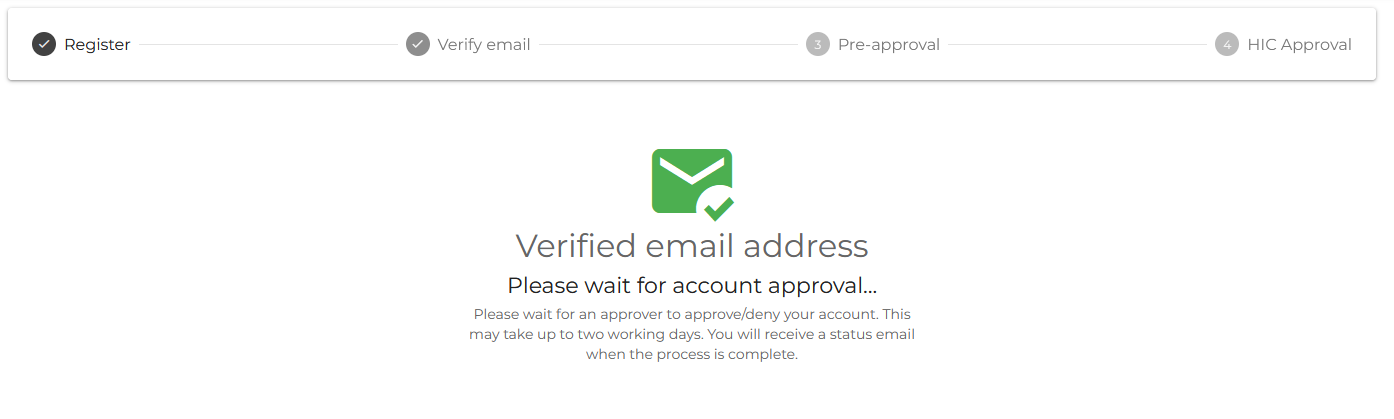
After email verification, the approver is notified and can approve or deny the application.
Request for Revision
In some cases, if the approver requires more clarity or minor edits from the user, the approver can send back the registration application back to the user for revision. If this happens, the user will receive an email with an email link requesting that the application be updated. The user can read the approver's reason for asking for the revision and once the user has revised the application to address the approver's concern, the user can resubmit the application for approval.